Last year, we have open-sourced and made extensive use of two Ruby libraries in our API: mongoid-cached-json and garner. Both transform the procedural nightmare of caching and JSON generation into a declarative and easily manageable DSL. It was worth the investment, since our service spends half of its time generating JSON and reading from and writing to Memcached.

Today we’ve released mongoid-cached-json 1.4 with two interesting performance improvements.

Read on →

A few days ago we have started seeing the Heroku deployments of one of our applications randomly hang during bundle install. The problem worsened with time and we were not able to do a deployment for days.

$ git push -f git@heroku.com:application.git FETCH_HEAD:master
-----> Deleting 12 files matching .slugignore patterns.
-----> Ruby/Rails app detected
-----> Using Ruby version: ruby-1.9.3
-----> Installing dependencies using Bundler version 1.3.0.pre.5
       Running: bundle install --without development:test --path vendor/bundle --binstubs vendor/bundle/bin
       Fetching gem metadata from http://rubygems.org/.......
       Fetching gem metadata from http://rubygems.org/..
/app/slug-compiler/lib/utils.rb:66:in `block (2 levels) in spawn': command='/app/slug-compiler/lib/../../tmp/buildpacks/ruby/bin/compile /tmp/build_1p6071sni4hh1 /app/tmp/repo.git/.cache' exit_status=0 out='' at=timeout elapsed=900.1056394577026 (Utils::TimeoutError)
  from /app/slug-compiler/lib/utils.rb:52:in `loop'
  from /app/slug-compiler/lib/utils.rb:52:in `block in spawn'
  from /app/slug-compiler/lib/utils.rb:47:in `popen'
  from /app/slug-compiler/lib/utils.rb:47:in `spawn'
  from /app/slug-compiler/lib/buildpack.rb:37:in `block in compile'
  from /app/slug-compiler/lib/buildpack.rb:35:in `fork'
  from /app/slug-compiler/lib/buildpack.rb:35:in `compile'
  from /app/slug-compiler/lib/slug.rb:497:in `block in run_buildpack'
 !     Heroku push rejected, failed to compile Ruby/rails app

Seeing bundler hang on “Fetching gem metadata from http://rubygems.org/”, my immediate reaction was to blame the RubyGems Dependency API for its poor performance and attempt the recommended workaround of switching to http://bundler-api.herokuapp.com. That didn’t work.

I also tried to reproduce the issue on a local environment, including a (what I thought was) a completely clean machine at no avail. My bundle install would always succeed.

Finally, everything pointed at an infrastructure problem with Heroku itself, so I opened a ticket (#72648), tweeted endlessly to Heroku devs, pinged a contact at Heroku on Skype and generally annoyed people for 5 straight days. It was a frustrating problem and I was getting no useful help.

Fast forward, this turned out to be an issue in Bundler. Narrowing it down would have been relatively easy if I had known where to look.

I hope this post helps you with similar issues.

Read on →

Heroku will log an R10 - Boot Timeout error when a web process takes longer than 60 seconds to bind to its assigned port. This error is often caused by a process being unable to reach an external resource, such as a database or because you have a lot of gems in your Gemfile which take a long time to load.

Dec 12 12:12:12 prod heroku/web.1:
  Error R10 (Boot timeout)
  Web process failed to bind to $PORT within 60 seconds of launch

There’s currently no way to increase this boot timeout, but we can beat it with a proxy implemented by our new heroku-forward gem.

Read on →

Knowing how well your API performs in real time is essential to any successful project. That’s because you can’t fix what you can’t measure.

We use and heavily contribute to Grape, a Ruby API DSL. Grape is a Rack middleware and we have been reporting API performance data to NewRelic with code from my older blog post.

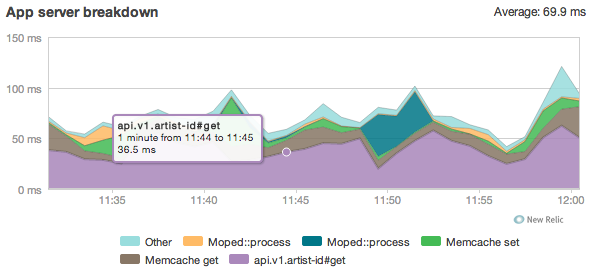
It’s time to improve the reporting implementation and address performance monitoring in both development and production environments. Here’s what a single API request breakdown is going to look like.

Read on →

All Artsy URLs shared publicly are humanly readable. For example, you’ll find all Barbara Kruger’s works at artsy.net/artist/barbara-kruger and a post by Hyperallergic entitled “Superfluous Men Can’t Get No Satisfaction” at artsy.net/hyperallergic/post/superfluous-men-cant-get-no-satisfaction. This is a lot prettier than having id=42 in the browser’s address and is a big improvement for SEO.

We construct these URLs with a gem called mongoid_slug. Interesting implementation details under the cut.

Read on →

There is a great deal of misinformation on the web about detecting an iPad or an iPhone in JavaScript. The top answer on stackoverflow - and many blog posts using this technique - are all incorrect.

The conventional wisdom is that iOS devices have a user agent for Safari and a user agent for the UIWebView. This assumption is incorrect as iOS apps can and do customize their user agent. The main offender here is Facebook, whose iOS app alone accounts for about 1-3% of Artsy’s daily traffic.

Compare these user agent strings from iOS devices:

# iOS Safari
iPad: Mozilla/5.0 (iPad; CPU OS 5_1 like Mac OS X) AppleWebKit/534.46 (KHTML, like Gecko) Version/5.1 Mobile/9B176 Safari/7534.48.3
iPhone: Mozilla/5.0 (iPhone; CPU iPhone OS 5_0 like Mac OS X) AppleWebKit/534.46 (KHTML, like Gecko) Version/5.1 Mobile/9A334 Safari/7534.48.3

# UIWebView
iPad: Mozilla/5.0 (iPad; CPU OS 5_1 like Mac OS X) AppleWebKit/534.46 (KHTML, like Gecko) Mobile/98176
iPhone: Mozilla/5.0 (iPhone; U; CPU iPhone OS 4_1 like Mac OS X; en-us) AppleWebKit/532.9 (KHTML, like Gecko) Mobile/8B117

# Facebook UIWebView
iPad: Mozilla/5.0 (iPad; U; CPU iPhone OS 5_1_1 like Mac OS X; en_US) AppleWebKit (KHTML, like Gecko) Mobile [FBAN/FBForIPhone;FBAV/4.1.1;FBBV/4110.0;FBDV/iPad2,1;FBMD/iPad;FBSN/iPhone OS;FBSV/5.1.1;FBSS/1; FBCR/;FBID/tablet;FBLC/en_US;FBSF/1.0]
iPhone: Mozilla/5.0 (iPhone; U; CPU iPhone OS 5_1_1 like Mac OS X; ru_RU) AppleWebKit (KHTML, like Gecko) Mobile [FBAN/FBForIPhone;FBAV/4.1;FBBV/4100.0;FBDV/iPhone3,1;FBMD/iPhone;FBSN/iPhone OS;FBSV/5.1.1;FBSS/2; tablet;FBLC/en_US]

Read on →

This post details the first of many challenges we faced in 3D transforming the homepage of Artsy (inspired by Meny): detecting CSS 3D transform support.

Front-end development is messy in today’s fragmented world. At Artsy, our goal is to do what it takes to provide an incredible experience for all of our users (IE8+, iOS and the usual suspects). Deploying bleeding edge tech, like CSS 3D transforms, is an exercise in compromising principals for practicality – and managing these “compromises” in well-documented code.

We looked to Modernizr’s feature detection approach to provide us with a reliable way to detect CSS3 3D transform support across browsers. They have some well- documented struggles around the issue. After flipping most of the tables in the office ┻━┻ ︵ヽ (`Д´)ノ︵ ┻━┻ , we settled on user agent sniffing as the most robust method for detecting CSS3 3D transform support. But why did none of the available methods work for us?

Read on →

The public launch of Artsy via the New York Times is a good opportunity to describe our current technology stack.

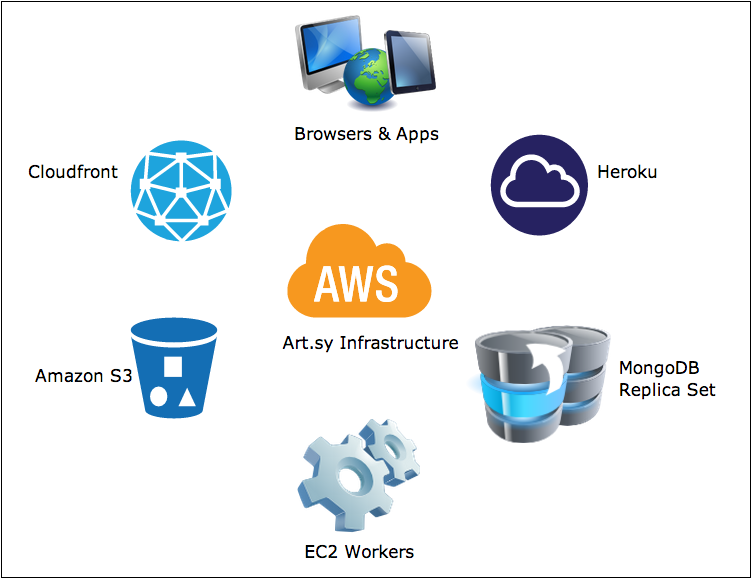
What you see when you go to Artsy is a website built with Backbone.js and written in CoffeeScript. It renders JSON data from Ruby on Rails, Ruby Grape and Node.js services. Text search is powered by Apache Solr. We also have an iOS application that talks to the same back-end Ruby API. We run all our web processes on Heroku and all job queues on Amazon EC2. Our data store is MongoDB, operated by MongoHQ and we have some Redis instances. Our assets, including images, are served from Amazon S3 via the CloudFront CDN. We heavily rely on Memcached Heroku addon and we use SendGrid and MailChimp to send e-mail. Systems are monitored by a combination of New Relic and Pingdom. All of this is built, tested and deployed with Jenkins.

In this post I’ll go in depth in our current system architecture and tell you the story about how these parts all came together.

Read on →

We now have over 4700 RSpec examples in one of our projects. They are stable, using the techniques described in an earlier post and organized in suites. But they now take almost 3 hours to run, which is clearly unacceptable.

To solve this, we have parallelized parts of the process with existing tools, and can turn a build around in just under an hour. This post will dive into our Jenkins build flow setup.

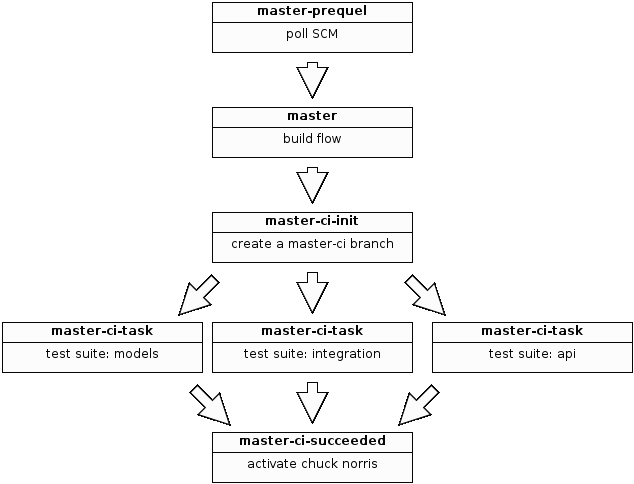
To keep things simple, we’re going to only build the master branch. When a change is committed on master we’re going to push master to a master-ci branch and trigger a distributed build on master-ci. Once all the parts have finished, we’ll complete the build by pushing master-ci to master-succeeded and notify the dev team of success or failure.

Here’s a diagram of what’s going on.

Read on →