The past year has been an exciting one for our mobile apps (Artsy, Folio and Palette Mobile) and we started to finally get closer to where we want to be: High-performing and developer-friendly React Native applications, enabling rapid feature iteration and a superior user experience.
We would like to share with you some of the improvements we made that might also be applicable to your react-native app.
Infra
Expo!
At the end of 2024, after RFC: Trial Expo in Energy and/or Palette-Mobile, Spike on Eigen Risks, Rewards and Effort, we decided that we are giving Expo a try. Quickly afterwards, we added Expo with Prebuild on 2 out of 3 of our Apps: The CMS App, named Folio and our design system app, named Palette-Mobile.
For our main app, Eigen, adding expo sdk happened faster than we thought after Microsoft decided to retire VS App Center. We needed an alternative for code-push, and we settled for Expo over-the-air updates.
Eigen still has a lot of native code blocking us from fully migrating to Continue Native Generation (CNG) and sometimes conflicting with Expo. However, our experience from Energy and Palette-mobile has been positive so far and we could imagine CNG in Eigen! We will definitely share more about this if it happens.
The new architecture
Yes! We did it, all our apps are on the new architecture now. Expect a blog post about this!
Tech Debt
Eigen is an old repo, it’s probably one of the oldest react-native apps out there. This comes with a price though. The industry changed a lot in the past years and a lot of the legacy code can now be rewritten using modern patterns more easily (and efficiently).
To address that, we identified some weaknesses we had and prioritised them and decided to address them. Some notable mentions here include:
Refactor our navigation
Not long ago, it was hard for us to imagine our navigation infra all handled in react-navigation. But with more and more screens being rewritten in react-native and RN becoming more performant, it actually finally became possible! And we were so happy to do it. This refactor helped us make it easier to add routes, reduced our navigate helper method latency from 320ms to 70ms, and most importantly consolidated our Android and iOS navigation infra.
Our city guide is now fully built with React Native - and is available for Android
The city guide is an old RN component with lots of logic we had in the native side. Although we rarely had issues with it, it was pretty tricky to make any changes there. This migration makes it easier for our product teams to extend the city guide without sacrificing UX.
Refactor our push notifications
Our push notifications handling logic differed between iOS and Android, making it tricky to keep the same logic across both platforms because you would need to implement everything twice - especially tracking.
While migrating to the new architecture, we were able to consolidate both platforms thanks to Notifee - PR here.
Better Keyboard handling
This is a favourite for me because proper keyboard handling in mobile apps is an important factor in mobile apps UX, and it was never easy. Until react-native-keyboard-controller came to the rescue!
If you haven’t already, I recommend you check out this talk from the author Kiryl Ziusko on youtube: https://www.youtube.com/watch?v=W_Y0Y18aFV8
DX
Rozenite
You hear a lot of good stuff about RN, but debugging was never a strong point until the last few versions when the new RN debugger was announced over at React Universe Conf 2024. It was something everyone in the community welcomed and it enabled other additions like Rozenite, that helped us do a lot more from the debugger and bring us “closer” to the web debug experience.
So far, we have plugins to debug navigation events, to inspect our bundle size, networks and monitor performance. See PRs here and here and watch the announcement talk from this year’s React Universe Conf
Mise
This is not specific to our mobile apps, but it’s something we did in all our repos after: RFC: Migrate from asdf to mise If you haven’t tried it already, you are missing out on a lot. It just works, no drama!
Yarn doctor and Yarn repair
The most pain we had over the years in our major repo (Eigen), is when devs who don’t work often in the repo get back to it. Quite often, dependency drift happened and fixing the environment isn’t trivial. It’s why we added these commands to help with some of the failures.
Better betas overview
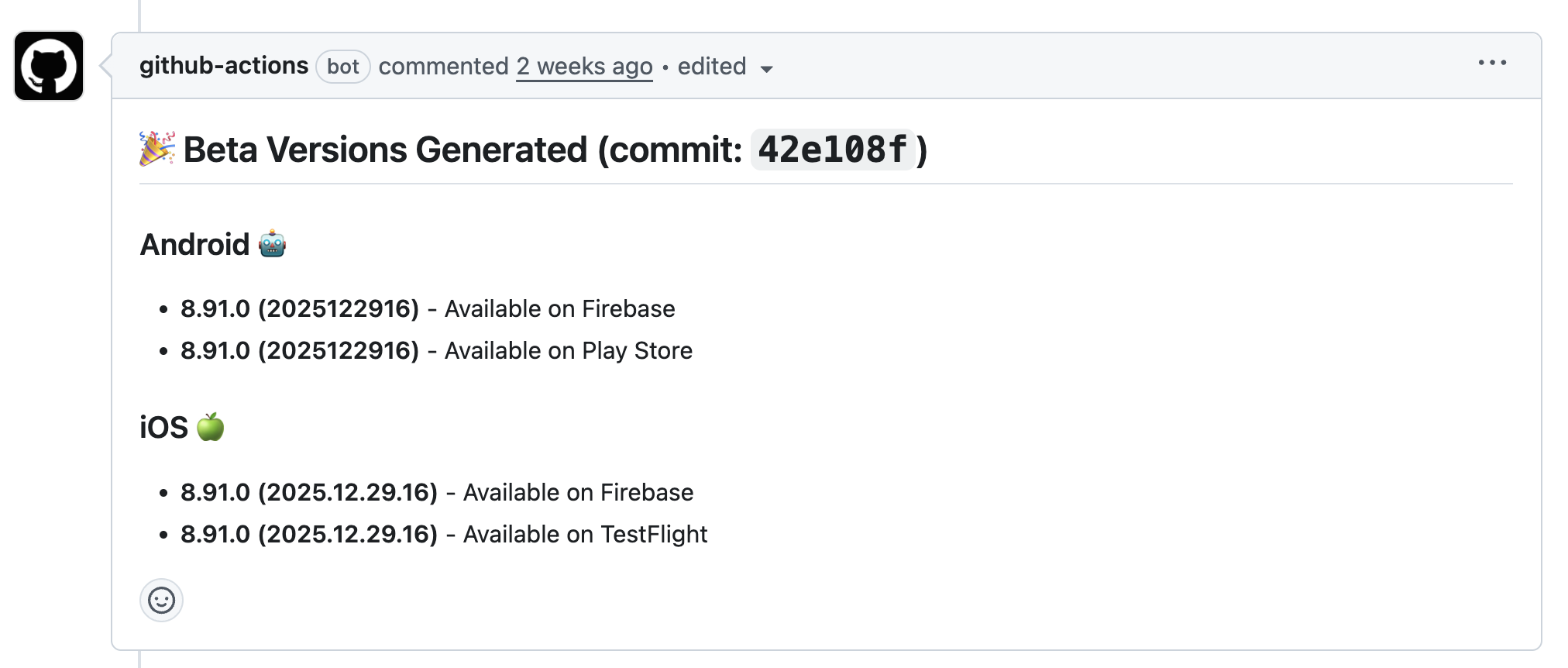
One annoyance we always had when working on branches that require creating multiple betas, is getting the build number. Since we moved our build process to happen on Github Actions, it was only natural to us that while we are at it, to comment the build number on Github.
Performance
Last year, we did a lot of work to improve our mobile vitals. The most clear one was TTI. That was so fun to work on, and we think the changes we brought can be applied anywhere.
Queries optimization
What we did was pretty simple:
- Fetch only what you need (minimal payload)
- Fetch before you need it (speculative prefetching)
- Fetch things separately when possible (query splitting)
Example:
Let’s think of how we can optimise the fair screen query: This is a query that fetches the fair metadata, overview, exhibitors, and artworks.
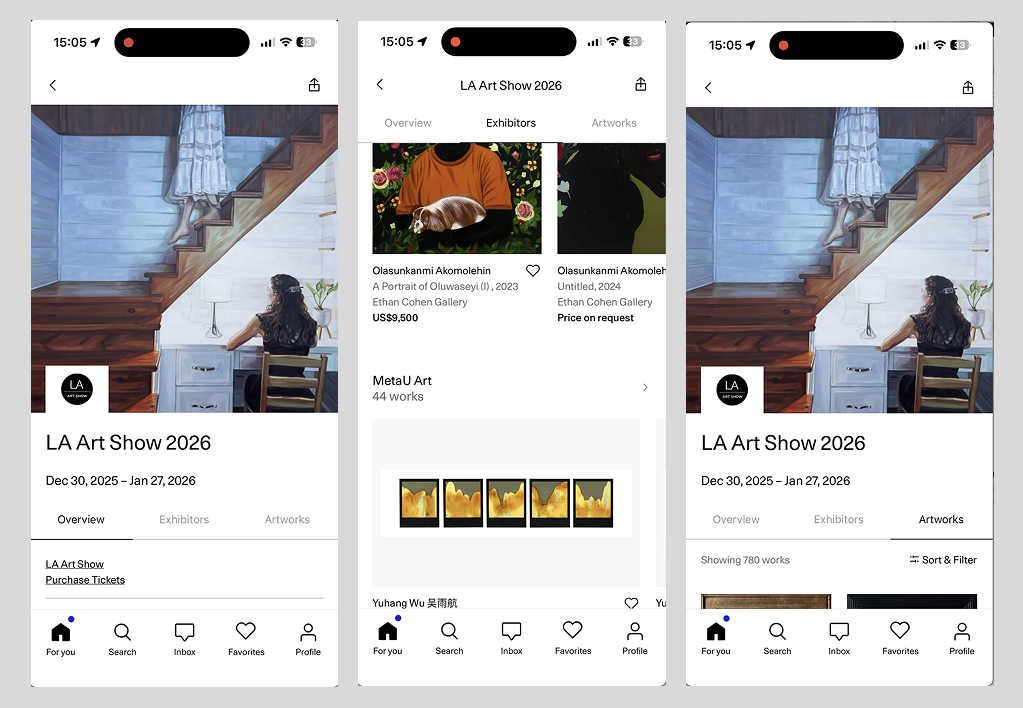
- Define a query that fetches only the artist image and metadata
- Prefetch that query whenever there is an artist visible - before the user taps it!
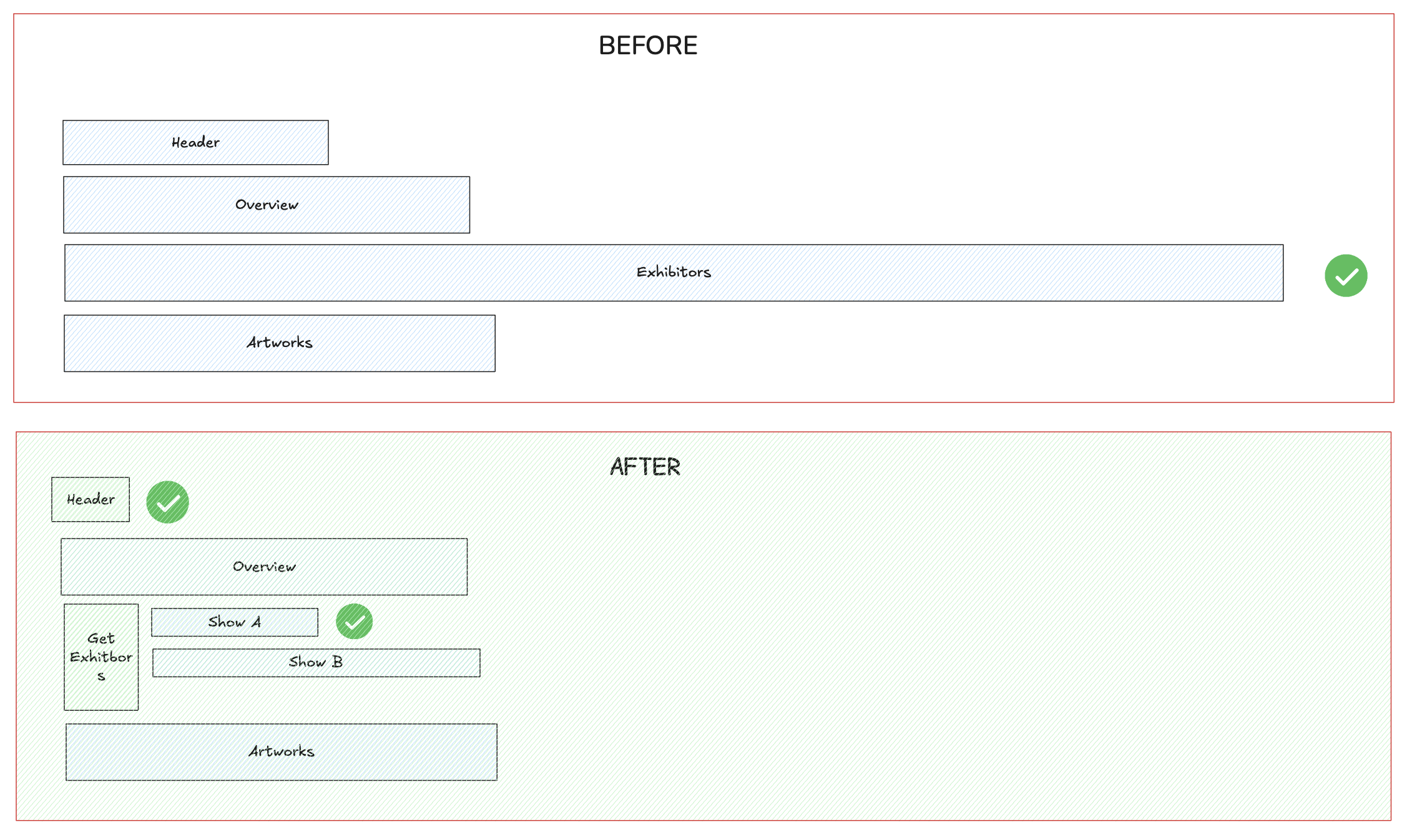
- Define the other tabs queries and apply the same concept to the tabs queries
Example: To render the exhibitors tab, we don’t need just one query. In our case, because getting the artwork for each exhibitor was taking a long time, we had multiple queries, one to get the exhibitor metadata, and another query to get the artworks, that is lazily loaded when the exhibitor rail is close to the viewport
Bonus: Because the first query result is the same to all users (the artist name and image is always the same) - we can actually cache that query in our Cloudflare CDN and return it immediately.
We applied the same concept to most of our major screens and in many cases, we were able to bring the TTI to under 100ms thanks to our Cloudflare CDN cache hits, making the navigation in the app feel seamless.
FPS optimizations
Here, the tips from Callstack’s Master React Native Performance Optimization were very useful to us and led to noticeable improvements in multiple surfaces.
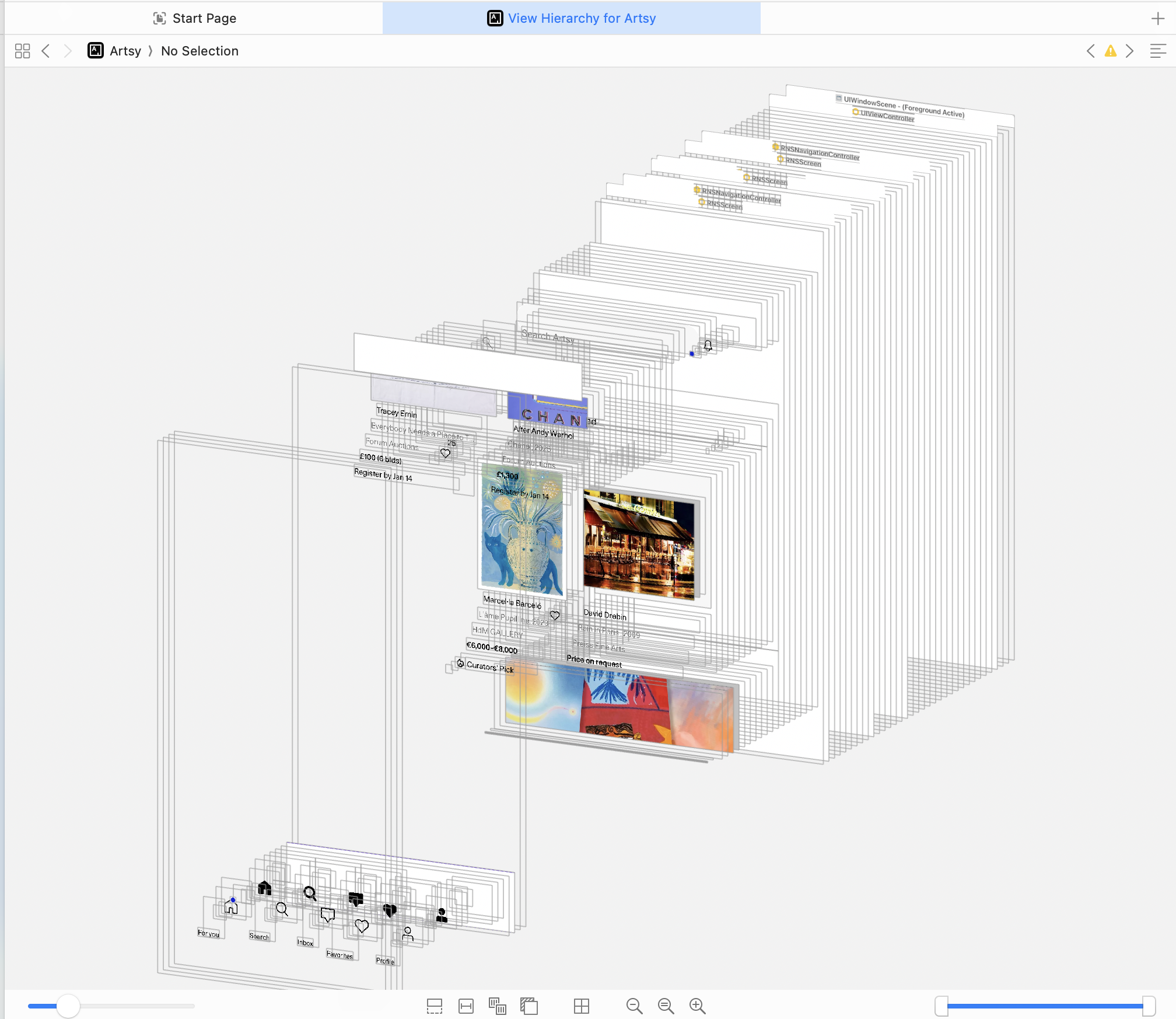
However, in some cases, they were not enough and we had to use some of the native debugging tools to investigate high CPU usage causing frame drops. What helped us was Xcode View Hierarchy, which revealed that we were always loading skeletons behind our images, even after the image was loaded.
CI
Migrating to Github Actions
Thanks to being an open source project, Eigen was eligible to use Github Actions for free! Thanks to having modular scripts, and Github Actions and Circle CI having a more or less similar language/concept, this was a trivial migration for us that saved us a good amount of CircleCI tokens.
Reduce Android build time by 75%
Sometimes, you can make a major improvement with one line of code. This was the case here. Thanks to Speeding up your Build phase we were able to reduce our build time by 75%. The idea is simple here, instead of building all 4 ABIs (armeabi-v7a, arm64-v8a, x86 & x86_64), we build only the one that is relevant for us: arm64-v8a
E2E Tests
Reliable E2E testing in react-native is tricky. Over the years, we tried multiple tools but we never added them to our CI pipeline. 2025 was different, we added E2E test coverage to some of our critical user flows to facilitate QA. We settled for Maestro and we are looking forward to expanding our coverage in 2026.
On Android, along with Flashlight, this enabled us to also run performance tests, which were very useful when upgrading to the new architecture.
Other mentions
- We migrated to a more secure secrets management library -
react-native-keys - Significant Android quality increase - shout out to mobile practice and deciding to prefer Android screenshots and videos in PRs - we started the year with a 28-day average rating of 4.1 stars, ended with 4.8 stars and a default Google Play rating of 4.4 stars.
- Established Performance SLAs (crash rate, query latency…)
What’s next?
We’re excited for what’s ahead in 2026! The React Native ecosystem continues to mature, and we’re looking forward to more stable releases that’ll make our lives easier 🤞
One area we’re particularly excited about is CNG and improving our developer experience with AI tooling. We’ve started experimenting with Claude and leveraging Skills to make AI assistants more effective in our repos. The idea is simple: instead of the AI having to figure out our conventions every time, we can document our patterns, architecture decisions, and common tasks in a way that makes collaboration seamless. Early results have been promising, and we’re excited to see how this evolves.
If you’re interested in any of the topics we covered here, feel free to reach out! We will be happy to share more details about it.